https://github.com/sheos-org/eos21
https://github.com/sheos-org/eos21/blob/master/README-CH.MD
没测试,需要的自行参考自测把
uint64_t read_only::get_table_index_name(const read_only::get_table_rows_params& p, bool& primary) {
   using boost::algorithm::starts_with;
   // see multi_index packing of index name
   const uint64_t table = p.table;
   uint64_t index = table & 0xFFFFFFFFFFFFFFF0ULL;
   EOS_ASSERT( index == table, chain::contract_table_query_exception, "Unsupported table name: ${n}", ("n", p.table) );

   primary = false;
   uint64_t pos = 0;
   if (p.index_position.empty() || p.index_position == "first" || p.index_position == "primary" || p.index_position == "one") {
      primary = true;
   } else if (starts_with(p.index_position, "sec") || p.index_position == "two") { // second, secondary
   } else if (starts_with(p.index_position , "ter") || starts_with(p.index_position, "th")) { // tertiary, ternary, third, three
      pos = 1;
   } else if (starts_with(p.index_position, "fou")) { // four, fourth
      pos = 2;
   } else if (starts_with(p.index_position, "fi")) { // five, fifth
      pos = 3;
   } else if (starts_with(p.index_position, "six")) { // six, sixth
      pos = 4;
   } else if (starts_with(p.index_position, "sev")) { // seven, seventh
      pos = 5;
   } else if (starts_with(p.index_position, "eig")) { // eight, eighth
      pos = 6;
   } else if (starts_with(p.index_position, "nin")) { // nine, ninth
      pos = 7;
   } else if (starts_with(p.index_position, "ten")) { // ten, tenth
      pos = 8;
   } else {
      try {
         pos = fc::to_uint64( p.index_position );
      } catch(...) {
         EOS_ASSERT( false, chain::contract_table_query_exception, "Invalid index_position: ${p}", ("p", p.index_position));
      }
      if (pos < 2) {
         primary = true;
         pos = 0;
      } else {
         pos -= 2;
      }
   }
   index |= (pos & 0x000000000000000FULL);
   return index;
}
Position of the index used, accepted parameters primary, secondary, tertiary, fourth, fifth, sixth, seventh, eighth, ninth , tenth
index_position 可以以某前缀的名字指定对应多级索引,或者数字(从2开始)
read_only::get_table_rows_result read_only::get_table_rows( const read_only::get_table_rows_params& p )const {
   const abi_def abi = eosio::chain_apis::get_abi( db, p.code );
#pragma GCC diagnostic push
#pragma GCC diagnostic ignored "-Wstrict-aliasing"
   bool primary = false;
   auto table_with_index = get_table_index_name( p, primary );
   if( primary ) {
      EOS_ASSERT( p.table == table_with_index, chain::contract_table_query_exception, "Invalid table name ${t}", ( "t", p.table ));
      auto table_type = get_table_type( abi, p.table );
      if( table_type == KEYi64 || p.key_type == "i64" || p.key_type == "name" ) {
         return get_table_rows_ex<key_value_index>(p,abi);
      }
      EOS_ASSERT( false, chain::contract_table_query_exception,  "Invalid table type ${type}", ("type",table_type)("abi",abi));
   } else {
      EOS_ASSERT( !p.key_type.empty(), chain::contract_table_query_exception, "key type required for non-primary index" );

      if (p.key_type == chain_apis::i64 || p.key_type == "name") {
         return get_table_rows_by_seckey<index64_index, uint64_t>(p, abi, [](uint64_t v)->uint64_t {
            return v;
         });
      }
      else if (p.key_type == chain_apis::i128) {
         return get_table_rows_by_seckey<index128_index, uint128_t>(p, abi, [](uint128_t v)->uint128_t {
            return v;
         });
      }
      else if (p.key_type == chain_apis::i256) {
         if ( p.encode_type == chain_apis::hex) {
            using  conv = keytype_converter<chain_apis::sha256,chain_apis::hex>;
            return get_table_rows_by_seckey<conv::index_type, conv::input_type>(p, abi, conv::function());
         }
         using  conv = keytype_converter<chain_apis::i256>;
         return get_table_rows_by_seckey<conv::index_type, conv::input_type>(p, abi, conv::function());
}primary key 只支持uint64_t 和 capi_name
如果想支持其他类型只能用
二级索引支持了 index_position + key_type
它们是多索引表,因为它们支持在数据上使用多个索引,主索引类型必须是uint64_t并且必须是唯一的,但其他次要索引可以具有重复项。最多可以有16个附加索引,字段类型可以是uint64_t,uint128_t,eosio::checksum256,double或long double
https://developers.eos.io/eosio-cpp/docs/using-multi-index-tables#section-introduction
https://developers.eos.io/eosio-nodeos/reference#get_table_rows
https://eosio.stackexchange.com/questions/3091/is-it-possible-to-use-a-type-other-than-uint64-t-for-a-table-primary-key/3097#3097
const getPopup = async () => {
            try {
                const url = apis.runtime.getURL('/prompt.html');

                // Notifications get bound differently depending on browser
                // as Firefox does not support opening windows from background.
                if(typeof browser !== 'undefined') {
                    const created = await apis.windows.create({
                        url,
                        height,
                        width,
                        type:'popup'
                    });

                    window.notification = notification;
                    return created;
                }
                else {
                    const win = window.open(url, 'ScatterPrompt', `width=${width},height=${height},resizable=0,top=${middleY},left=${middleX},titlebar=0`);
                    win.data = notification;
                    openWindow = win;
                    return win;
                }
            } catch (e) {
                console.log('notification error', e);
                return null;
            }
}最近在做eos数据落盘的项目,遇到了很多场景,都需要备份数据。所以,今天跟大家分享下备份节点数据的小工具。
eos节点非正常退出,甚至节点升级,都会意外导致脏数据的产生,节点数据不得不重新同步。官方给的数据重新同步方法,是用下面的命令重启节点:
nodeos --hard-replay不过,实际使用起来会发现replay数据执行的非常慢,普通的全节点也要两天时间才能完成重新同步。归根结底,还是eos节点数据的验证机制导致的慢。具体原因,大家可以看看这篇文章:痛苦的EOS数据同步,可能的EOS安全隐患。
简而言之,eos之所有不能像以太坊那样做到快速同步,是因为eos没有将状态数据生成merkle root,存储上链。所以,eos重新同步数据时,节点不能信任其他节点,只能重新执行一遍交易,亲自验证交易状态,当然会极大影响同步速度。另外,节点的同步只能从创世块开始,不能按照时间分片,同步相当于重新计算一遍全网交易,速度可想而知。
eos的节点数据是存储在data目录的,data目录里有blocks和state目录,分别存储区块信息和状态信息:
mac os:~/Library/Application\ Support/eosio/nodeos/data
Linux:~/.local/share/eosio/nodeos/data
因为eos数据是按文件形式存储的,常用的备份方法是将data目录整个拷贝一份,当数据坏了时,启用备用data目录,则节点会从备用data目录的高度开始,再同步之后的数据。这个方法简单,但是普通的全节点,不开history-plugin时数据30G+,开启history-plugin数据可达500G。简单的cp操作处理备份,显然需要数小时不等,还是太慢。
pitreos是加拿大超级节点 eos canada 出品的节点数据备份工具,项目地址:pitreos。
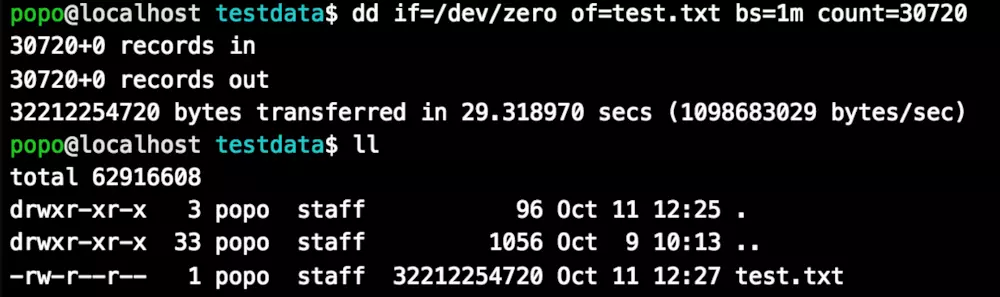
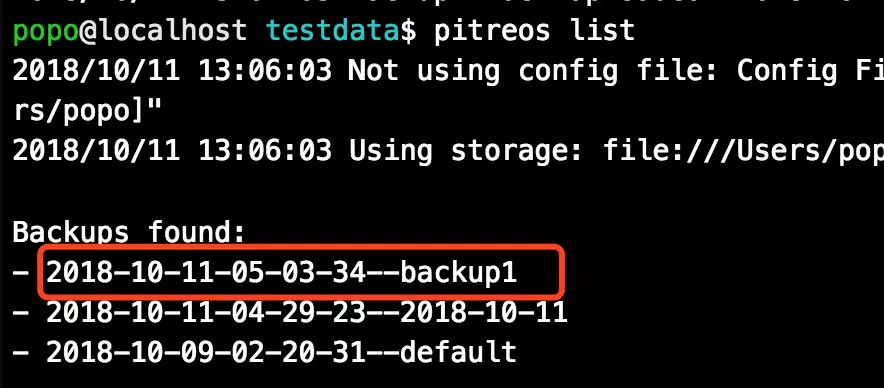
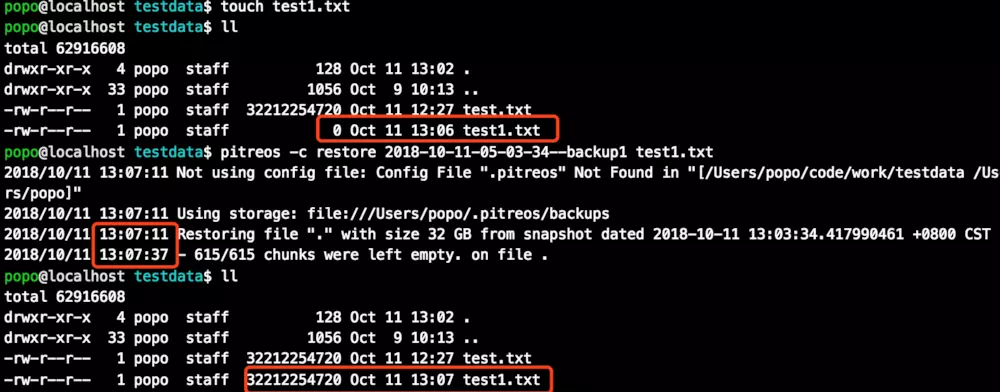
它实现了大文件的快速备份和恢复。以下是30G大文件备份和恢复的实测效果,备份和恢复处理时间各约30s,极大的提升了效率。

1. 需要安装golang、设置gopath
2. cd $GOPATH/src/github.com/eoscanada
3. git clone https://github.com/eoscanada/pitreos.git
4. cd $GOPATH/src/github.com/eoscanada/pitreos && go get -v ./... && go install -v备份:pitreos backup ./mydata -t <备份tag>。备份文件默认存在:$HOME/.pitreos/backups
恢复:pitreos -c restore <备份tag> ./mydata。
查询tag:pitreos list