PHP5.6 -> 7.0
# 禁用 Apache 中的 PHP5

sudo a2dismod php5.6

# 启用 PHP7

sudo a2enmod php7

# 重启 Apache

sudo systemctl restart apache2.service


# 切换 CLI

sudo update-alternatives --set php /usr/bin/php7.0PHP5.6 -> 7.0
# 禁用 Apache 中的 PHP5
sudo a2dismod php5.6
# 启用 PHP7
sudo a2enmod php7
# 重启 Apache
sudo systemctl restart apache2.service
# 切换 CLI
sudo update-alternatives --set php /usr/bin/php7.0编译好sql_db_plugin后启动nodeos
root@iZ2zea5mjpcmz9m17k56daZ:/home/surou/Documents/github/eos/build# nodeos --sql_db-uri=”mysql://db=eos user=root host=127.0.0.1 password='数据库密码' --sql_db-block-start=0  --delete-all-blocks
2018-07-25T12:39:28.628 thread-0   sql_db_plugin.cpp:81          set_program_options  ] set_program_options
2018-07-25T12:39:28.629 thread-0   chain_plugin.cpp:271          plugin_initialize    ] initializing chain plugin
2018-07-25T12:39:28.629 thread-0   chain_plugin.cpp:408          plugin_initialize    ] Deleting state database and blocks
2018-07-25T12:39:28.721 thread-0   chain_plugin.cpp:508          plugin_initialize    ] Starting up fresh blockchain with default genesis state.
2018-07-25T12:39:29.437 thread-0   http_plugin.cpp:344           plugin_initialize    ] configured http to listen on 127.0.0.1:8888
2018-07-25T12:39:29.437 thread-0   net_plugin.cpp:2941           plugin_initialize    ] Initialize net plugin
2018-07-25T12:39:29.437 thread-0   net_plugin.cpp:2966           plugin_initialize    ] host: 0.0.0.0 port: 9876
2018-07-25T12:39:29.437 thread-0   net_plugin.cpp:3036           plugin_initialize    ] my node_id is e5f1d9687a24d343c57e7ba32913db448147a2e9e7dc1fe12797a69c082e1c9a
2018-07-25T12:39:29.437 thread-0   wallet_plugin.cpp:42          plugin_initialize    ] initializing wallet plugin
2018-07-25T12:39:29.437 thread-0   sql_db_plugin.cpp:96          plugin_initialize    ] initialize
2018-07-25T12:39:29.437 thread-0   sql_db_plugin.cpp:104         plugin_initialize    ] connecting to ”mysql://db=eos
2018-07-25T12:39:29.438 thread-0 main.cpp:141 main ] Failed to find shared library for backend ”mysql报Failed to find shared library for backend ”mysql 错误。
查看EOS代码 eos\programs\nodeos\main.cpp:141
   } catch( const std::runtime_error& e ) {
      if( std::string(e.what()) == "database dirty flag set" ) {
         elog( "database dirty flag set (likely due to unclean shutdown): replay required" );
         return DATABASE_DIRTY;
      } else if( std::string(e.what()) == "database metadata dirty flag set" ) {
         elog( "database metadata dirty flag set (likely due to unclean shutdown): replay required" );
         return DATABASE_DIRTY;
      } else {
         elog( "${e}", ("e",e.what())); // :141
      }
      return OTHER_FAIL;
   } catch( const std::exception& e ) {
应该出在sql_db_plugin中的soci连接中
下载soci源代码
git clone https://github.com/SOCI/soci.git查看错误出现在
// non-synchronized helper
void do_register_backend(std::string const & name, std::string const & shared_object)
{
    // The rules for backend search are as follows:
    // - if the shared_object is given,
    //   it names the library file and the search paths are not used
    // - otherwise (shared_object not provided or empty):
    //   - file named libsoci_NAME.so.SOVERSION is searched in the list of search paths

    soci_handler_t h = 0;
    if (shared_object.empty() == false)
    {
        h = DLOPEN(shared_object.c_str());
    }
    else
    {
        // try system paths
        h = DLOPEN(LIBNAME(name).c_str());
        if (0 == h)
        {
            // try all search paths
            for (std::size_t i = 0; i != search_paths_.size(); ++i)
            {
                std::string const fullFileName(search_paths_[i] + "/" + LIBNAME(name));
                h = DLOPEN(fullFileName.c_str());
                if (0 != h)
                {
                    // already found
                    break;
                }
             }
         }
    }

    if (0 == h)
    {
        throw soci_error("Failed to find shared library for backend " + name);
    }
发现刚才出现此问题是因为输入的参数符号错误导致,问题停止跟进,以后在遇到类似的再跟进....
关闭apparmor
sudo /etc/init.d/apparmor stop关闭mysql
sudo /etc/init.d/mysql stop删除旧版本
sudo apt-get remove --purge mysql-\*
sudo find  / -name mysql -print //手动删除遗留文件  sudo rm -rf somedir
sudo apt-get remove --purge libmysqlclien\*
sudo apt-get remove apparmor
sudo apt autoremove目前已经有了现成可用于安装 MySQL Server、客户端和其它组件的 APT 存储库,我们需要先将 MySQL 存储库添加到 Ubuntu 18.04 的软件包源列表中:
wget -c https://dev.mysql.com/get/mysql-apt-config_0.8.10-1_all.debsudo dpkg -i mysql-apt-config_0.8.10-1_all.deb注意:在软件包安装过程中,系统会提示您选择 MySQL 服务器版本和其他组件,例如群集、共享客户端库或配置要安装 MySQL 的工作台。
默认 MySQL 服务器版本 mysql-8.0 的源将被自动选中,我们只需最终确定就可以完成发行包的配置和安装。

从所有已配置的存储库(包括新添加的 MySQL 8存储库)中下载最新的软件包信息:
sudo apt update然后运行如下命令安装 MySQL 8 社区服务器、客户端和数据库公用文件:
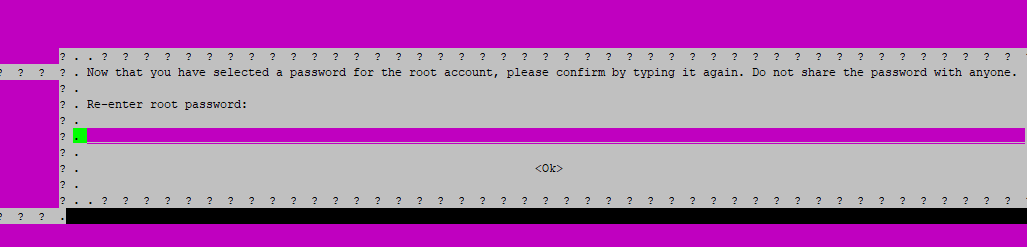
sudo apt-get install mysql-common mysql-server通过安装过程,将会要求为 MySQL 8 服务器的 root 用户输入密码,在输入和再次验证后按回车继续。
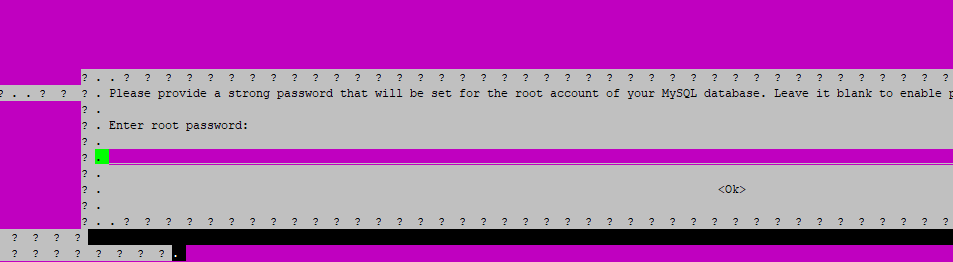
再次输入密码
此后,需要选择将要使用的默认身份认证插件,选择好之后按回车即可完成程序包配置。
身份认证插件有如下 2 种可供选择:
如果出现依赖问题
dpkg: error processing package mysql-server (--configure):
 dependency problems - leaving unconfigured
Processing triggers for libc-bin (2.23-0ubuntu10) ...
Errors were encountered while processing:
 mysql-community-server
 mysql-server
E: Sub-process /usr/bin/dpkg returned an error code (1)
检查下依赖
sudo apt-get install -f在升级之前, 您应该先更新当前的16.04. 建议升级之前更新/升级所有已安装的软件包.
sudo apt update && sudo apt dist-upgrade && sudo apt autoremovesudo apt-get install update-manager-coresudo nano /etc/update-manager/release-upgrades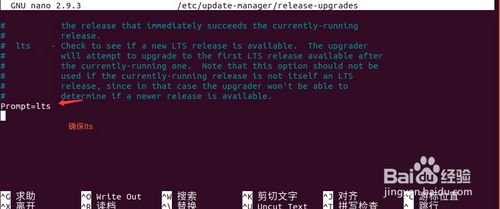
sudo do-release-upgrade -dgit clone https://github.com/superoneio/eos_sql_db_plugin
cp -rv eos_sql_db_plugin/sql_db_plugin/* /home/surou/Documents/github/eos/plugins/sql_db_plugin对比了以下几个维护的sql_db_plugin版本代码
eos/plugins/CMakeLists.txtadd_subdirectory(sql_db_plugin)前面的#注释eos/programs/nodeos/CMakeLists.txt// 取消下面代码前的注释,如果无注释,则忽略此步骤。
if(TARGET sql_db_plugin)
target_link_libraries( nodeos PRIVATE -Wl,${whole_archive_flag} sql_db_plugin -Wl,${no_whole_archive_flag} )
endif()./eosio_build.sh
cd build
sudo make install编译完成后,执行
nodeos --help | grep "sql_db-uri"如果输出如下内容,证明编译成功。
–sql_db-uri arg Sql DB URI connection string If not
sudo apt-get -y install libsoci-devsudo apt-get -y install mysql-client
sudo apt-get install libmysqlclient-devmysql -pCREATE DATABASE eos DEFAULT CHARACTER SET utf8mb4 COLLATE utf8mb4_unicode_ci;
GRANT ALL PRIVILEGES ON eos.* TO 你的账户名@'%' IDENTIFIED BY '你的密码';
GRANT ALL PRIVILEGES ON eos.* TO 你的账户名@'127.0.0.1' IDENTIFIED BY '你的密码';mysql > show databases;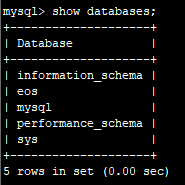
mysql > use eos;  //切换到eos 数据库
mysql > source eos_sql_db_plugin/sql_db_plugin/eos.db; //导入数据库nodeos --sql_db-uri="mysql://db=eos user=root host=127.0.0.1 password='数据库密码'" --sql_db-block-start=0 --delete-all-blockscat /etc/issue